Category: Blog

Your blog category

  • Week 6 Reflection Journal

    After watching “Create a Professional WordPress Website! | Twenty Twenty-Five Theme Tutorial,” I plan to use two key techniques: block patterns and global styles. The video showed how easily pre-built patterns can add hero sections, grids, and testimonials without coding, so I will insert these through the Site Editor (Appearance → Editor → Patterns) and customize the text and images for my brand. I will also set up global typography and color styles early on to keep my layout consistent. For example, I will use Montserrat for headings, Open Sans for body text, and a navy-teal-gray color palette through Styles → Typography and Styles → Colors. These design choices will make my site look cohesive, professional, and visually appealing across every page.

    One confusing part of the tutorial was understanding how templates and design variations interact in the Site Editor, mainly when changes affect multiple pages. To solve this, I plan to test edits on a staging site and note which templates apply to which pages. The tutorial also emphasized user experience (UX) by showing how clear call-to-actions and proper spacing guide visitors effectively. I will make sure my CTAs, such as “Contact Me” or “Get Started,” are visible above the fold, and I will preview layouts on mobile and tablet to confirm that text and buttons display cleanly. This focus on responsive design and accessibility, such as adding alt text and ensuring good color contrast, will help all users navigate my site easily.

    Finally, I learned how the new block-based Site Editor in Twenty Twenty-Five changes development by replacing PHP templates with drag-and-drop flexibility. This approach will let me edit headers, footers, and layouts visually without custom coding. The tutorial also introduced simple SEO strategies, such as writing keyword-rich titles, adding alt text, and linking between pages. I will apply these to help search engines understand my content and increase traffic. Overall, the video taught me how to combine design patterns, accessibility, and marketing strategies into a streamlined, professional WordPress site.


  • Homework 3 – The Media Library

    relaxing cinematic classical sound
    My favorite gaming YouTuber”Spoonkid”

    Before

    Cool landscape before editing

    After

    Cool landscape after editing
    Cropped, Flipped, and rotated
    fighter jet resized
    The original file was 16,015 KB, so I resized it to 1920px wide in Paint before uploading. This helped it load faster without losing much quality.

  • Lab 3 – Images

    sharkimage
    cool shark picture
  • Lab Activity – Create Pages/Posts

    After using WordPress on Hostinger, I discovered how simple it is to create and design a blog post using the Block Editor. Each block lets you control one piece of content, such as text, images, or columns. I appreciate that I can rearrange sections easily without breaking anything, which makes editing and organizing my post much faster.

    While exploring, I used several different blocks like Headings, Paragraphs, Images, Tables, Columns, and Galleries. Each block had its own purpose. For example, I used a Heading block to make titles stand out and a Gallery block to show screenshots of my site. It helped me understand how flexible the Block Editor really is compared to traditional text editors.

    I also experimented with Patterns like the Fullwidth Hero Image and the Call to Action Pricing Grid. These patterns made my post look professional with minimal effort. I liked that I could replace the placeholder text and images to make it my own, instead of starting from scratch.

    The overall process of writing and designing in WordPress felt user-friendly. At first, I was unsure about how to use columns and spacing, but after a few attempts, it started to make sense. I learned that previewing your post as you build helps you spot layout issues early.

    After completing this assignment, I feel much more confident about managing WordPress content. My only question is how to customize the default colors and fonts in the Twenty Twenty-Five theme so that all posts match the same style. This activity provided me with a better understanding of what it’s like to work with real website content, as opposed to just plain text.

    Tryingout
    differentblocks

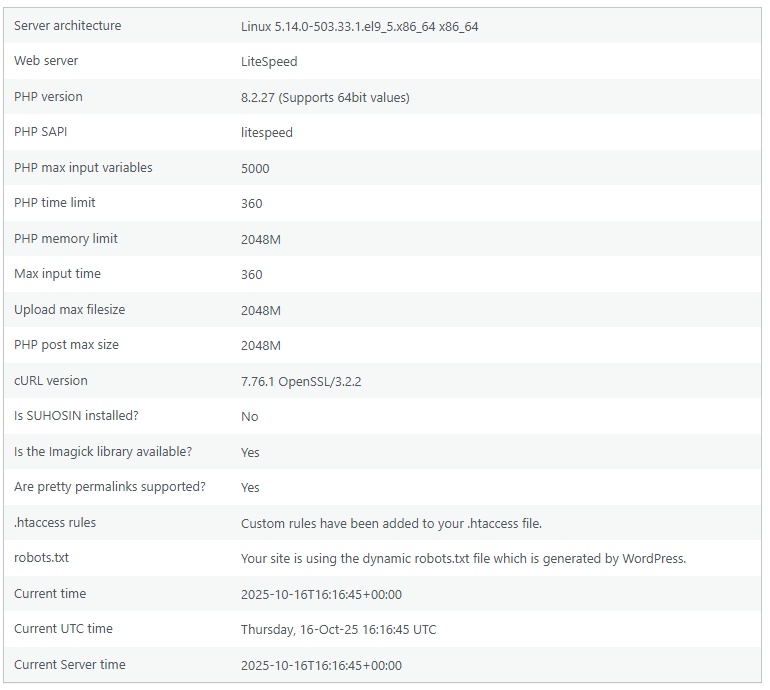
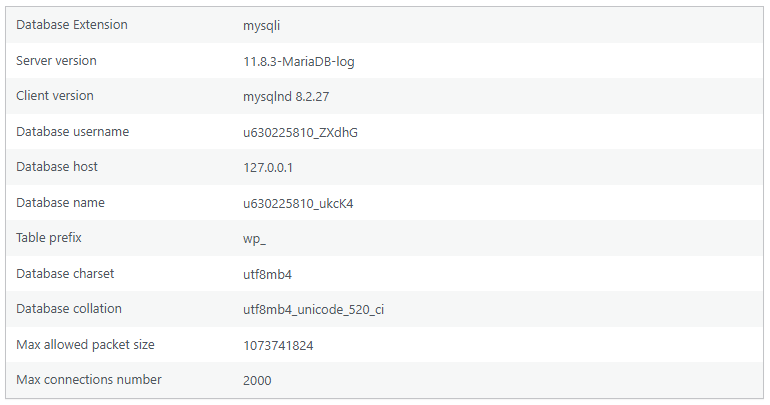
    database info

    Photo of a field full of flowers, a blue sky and a tree.

    Stories

    sharks

  • Hello world!

    Welcome to WordPress. This is your first post. Edit or delete it, then start writing!